Rise 360 · Microlearning

De-Escalation in 3 Minutes: A Microlearning Suite

Three 3-minute Rise 360 modules replacing a 42-slide, 90-minute PowerPoint delivered twice a year — because the moment a customer escalates is not the moment to remember something from a group session last March.

Gretchen Lautenschlager
Rise 360, Camtasia, Canva
3 modules × 2–3 minutes each
Frontline call center agents
Portfolio Demonstration
No LMS login required

Upload your Rise 360 screenshots or Camtasia video preview

Add Rise 360 screenshots, module map, or Camtasia preview

PNG, JPG, PDF, MP4, ZIP — max 20MB

The training wasn't bad. The format was wrong.

Before: a 42-slide PowerPoint titled "Customer Service Excellence Training" delivered in a 90-minute group session twice a year. Slides 1–6: company history. Slides 7–14: customer service philosophy. Slides 15–31: the 12-step de-escalation process. Slides 32–38: role-play instructions. Slides 39–42: a 10-question quiz.

"The problem wasn't that agents didn't care. They couldn't recall a 12-step process under pressure — because 90 minutes twice a year is not how human memory works under stress."

The root cause was a format mismatch. Call center agents face escalated customers in real time, under pressure, without time to think back to a training session from six months ago. What they needed wasn't more content. They needed access to the right three moves, right now, from their workstation.

Before I redesigned the content, I redesigned the container.

The first design decision was format, not content. A time-pressured agent who is already stressed will not open a 30-minute course. They will use something that takes 90 seconds and answers exactly one question: "What do I say right now?"

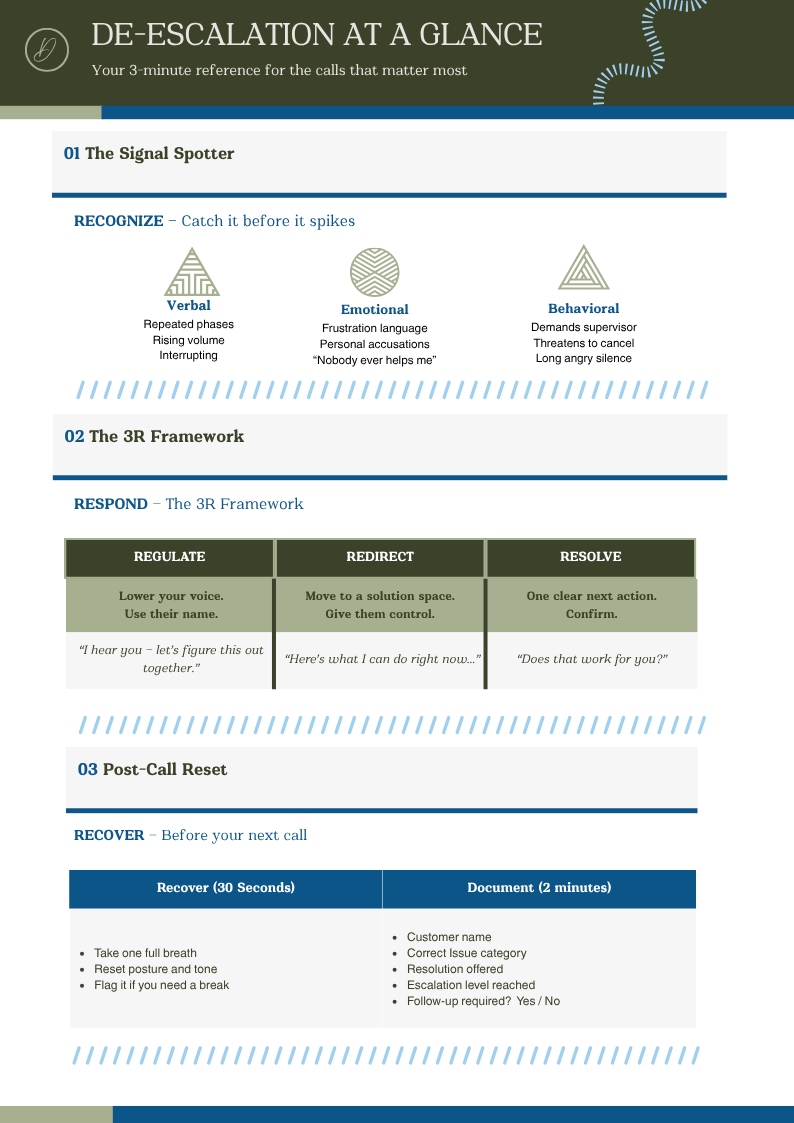
The 12-step process was reduced to three core moves — Acknowledge, Redirect, Resolve — each with three micro-modules:

Each module ends with a 45-second Camtasia video — a side-by-side comparison of an agent handling the same situation without the skill vs. with it. The difference is concrete and immediate.

The suite is linked directly from the agent's desktop toolbar. No LMS login. No course catalog. One click, right module, right moment.

Upload your content map, before/after comparison, or infographic

Add content map, module overview, or Canva infographic

PDF, DOCX, PNG — max 20MB

The same skill, in three minutes, available the moment it's needed.

The microlearning suite gives agents three things the original training never did: a format they'll actually use under pressure, language they can hear in their head mid-call (not recite on a quiz), and a performance support card (designed in Canva) they can keep visible at their workstation.

The before/after transformation is the most powerful artifact in this portfolio. A 42-slide PowerPoint → three modules totaling nine minutes of total content, available on-demand, designed for the specific moment they're needed. That shift in format is itself a design decision — and it's the kind of thinking that separates instructional design from content creation.

3
Modules × 2–3 minutes each
0
Clicks to LMS — desktop-linked
42→9
Slides to minutes: format transformation

What I'd do differently

I'd want data on whether direct desktop access vs. LMS delivery meaningfully changes completion rates. My hypothesis is yes — friction is the enemy of performance support — but I'd want to measure it. I'd also explore adding a fourth module that covers the edge cases: the call that escalates after what seemed like a resolution. That's the scenario where agents feel most stranded.

← Project 02: HIPAA Compliance Let's Work Together →